代码解析
我们可能会想,这段代码看起来和我今天在 Lambda 中编写的代码有些相似,只是多了一些持久执行 SDK 语法。有什么区别?是什么让它具有持久性?
在构建Durable functions时,Lambda 服务会在函数执行过程中维护一个所有持久操作(步骤、等待等)的检查点日志。
将检查点日志想象成一个专门记录每次执行中工作流每个操作的数据库。
以下是我们订单处理工作流的正常路径执行示例。
在这个示例中,我们将看到Durable functions的前两个优势——在等待期间不收费,以及如何在 Lambda 函数中编写长达一年的工作流,不再受 15 分钟超时限制的约束。
以下是执行过程:
- 初始执行:我们的函数运行,执行代码和持久操作。
- 持久操作:每个持久操作都被记录在检查点日志中。
- 暂停:当函数遇到
wait()时,它将等待操作的记录保存到检查点日志并暂停执行。- 在此等待步骤期间不收费。
- Durable functions中的等待时间最长可达一年。
- 恢复:当需要继续时,Lambda 会从头开始调用我们的函数,在持久操作之前。
- 重放:函数再次运行,但这次 SDK 会检查检查点日志。对于已完成的持久操作,它返回缓存结果而不是重新执行代码。
提示:持久操作之外的代码每次都会运行。只有 context.step() 和其他持久操作内部的代码才会被检查点记录并在重放时跳过。
sequenceDiagram
    participant User
    participant Lambda
    participant DurableContext
    participant Checkpoint

    User->>Lambda: Invoke function
    Lambda->>DurableContext: Execute handler
    DurableContext->>DurableContext: Step: create-order
    DurableContext->>Checkpoint: Save result
    DurableContext->>DurableContext: Wait 60 seconds
    DurableContext->>Checkpoint: Save wait state
    Note over Lambda: Function pauses<br/>No cost during wait
    Lambda-->>User: Execution paused

    Note over Lambda: 1 minute later...

    User->>Lambda: Resume execution
    Lambda->>DurableContext: Replay from start
    DurableContext->>Checkpoint: Get create-order result
    Note over DurableContext: Skip wait (already done)
    DurableContext->>DurableContext: Step: send-notification
    DurableContext->>Checkpoint: Save result
    Lambda-->>User: Return final result
让我们来分析Durable functions SDK 在我们的应用代码中是如何使用的。
@durable_execution 装饰器:
- 我们的处理函数(lambda_handler)使用
@durable_execution进行装饰。该装饰器通过提供DurableContext对象并管理检查点操作来启用Durable Execution。 - 我们的函数接收的不是标准 Lambda context,而是
DurableContext。该对象提供了用于持久操作的方法,如step()和wait(),这些方法会创建检查点。
@durable_execution
def lambda_handler(event: dict, context: DurableContext) -> dict:

    # Step 1: Create the order
    order_details = context.step(create_order())
    context.logger.info(f"Order created: {order_details['order_id']}")
@durable_step 装饰器:
每个步骤都使用 @durable_step 进行装饰。该装饰器将函数标记为创建检查点的持久步骤。
Step
每次 context.step() 调用都会在执行前后创建检查点。如果函数被中断,它将从最后一个完成的检查点恢复。函数不会重新执行已完成的步骤,而是使用其存储的结果。
@durable_step
def create_order(context: StepContext):
    order_id = f"order-{random.randint(1, 100)}"
    context.logger.info(f"Creating order... : {order_id}")
    return {
        "order_id": order_id,
        "total": 50.00,
        "status": "Created"
    }
等待
context.wait()调用会在不消耗计算资源的情况下暂停执行。当等待完成时,Lambda 会再次调用我们的函数并重放检查点日志,用已完成步骤的存储值替换。- 在我们的订单处理示例中,我们等待 60 秒,以便为支付处理系统确认交易并防止重复收费留出时间。这是电子商务工作流中需要与外部系统协调时的常见模式。
   # Step 1: Create the order
    order_details = context.step(create_order())
    context.logger.info(f"Order created: {order_details['order_id']}")

    # Step 2: Wait 1 minute (60 seconds)
    context.logger.info("Waiting 1 minute before sending notification...")
    context.wait(Duration.from_seconds(60))

    # Step 3: Send notification
    context.logger.info("Waited for 1 minute without consuming CPU.")
    notification_details = context.step(send_notification(order_details['order_id']))
    context.logger.info("Notification sent successfully...")
出错处理
现在我们已经看到了正常的执行过程,让我们来讨论Durable functions如何在出现问题时自动恢复。错误随时都会发生, 我们如何处理错误决定了架构良好的应用程序。
让我们再看看我们的订单处理工作流,假设通知服务宕机了,这对客户体验有什么影响?
Durable functions使处理工作流中的故障比以前更简单, Durable functions通过简单的可配置逻辑确保我们的工作流能够处理故障并重试任务。
当 Lambda 服务检测到工作流步骤(如发送通知)中的错误时,它将自动重试工作流。但它不会重新创建订单并等待 60 秒,而是从故障点恢复。我们可以在重试逻辑中配置自己的退避和抖动策略。
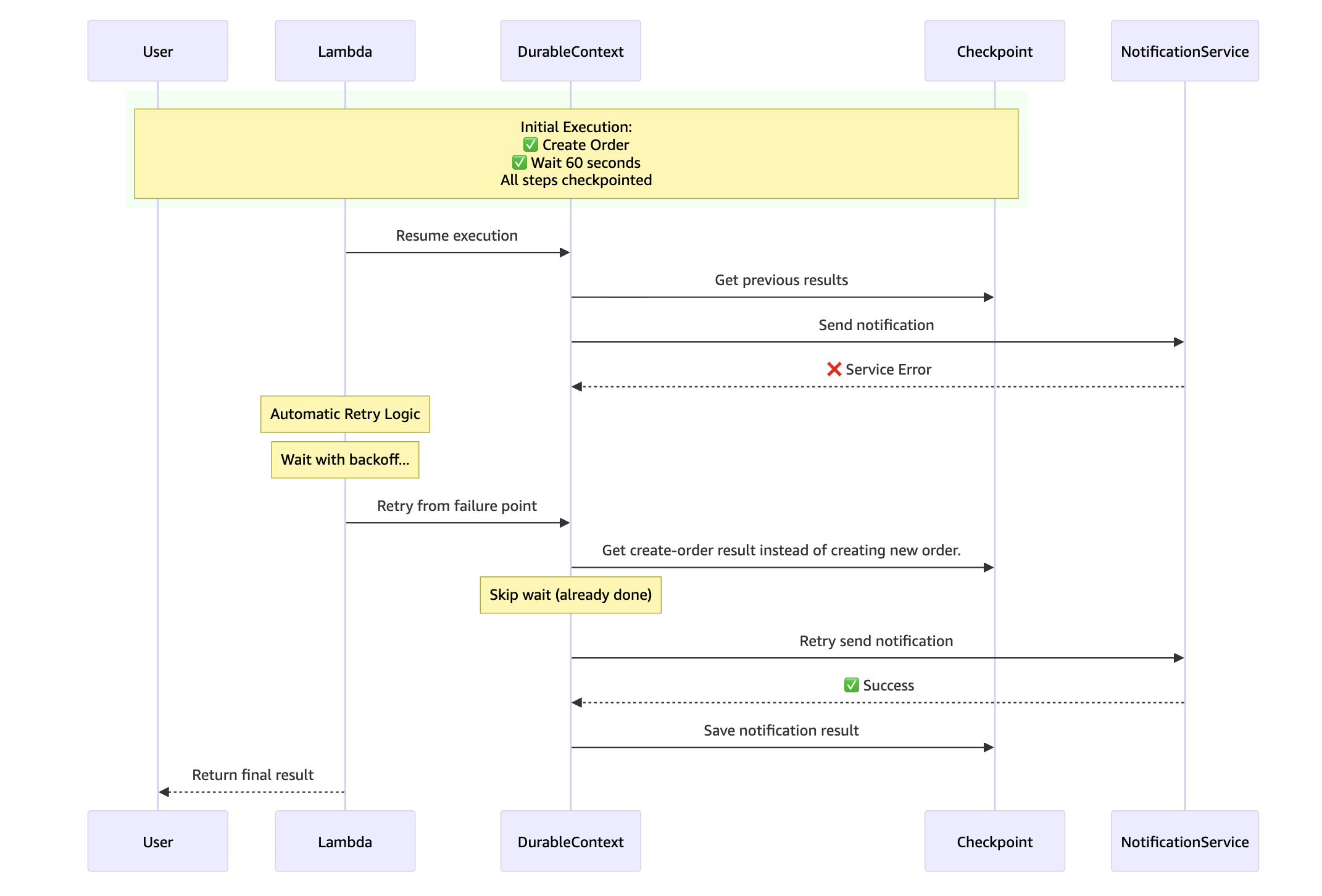
让我们来看看实际效果。我们修改了订单处理工作流,使其在发送通知步骤中有 50% 的概率产生错误。我们还将等待步骤从 60 秒减少到 5 秒,以加快工作流速度。
完成此练习后,请更新代码以删除模拟错误行为。
使用以下代码更新我们的function,然后构建并部署:
import random
import datetime

from aws_durable_execution_sdk_python.config import Duration
from aws_durable_execution_sdk_python.context import DurableContext, StepContext, durable_step
from aws_durable_execution_sdk_python.execution import durable_execution


@durable_step
def create_order(context: StepContext):
    order_id = f"order-{random.randint(1, 100)}"
    context.logger.info(f"Creating order... : {order_id}")
    return {"order_id": order_id,
            "total": 50.00,
            "status": "Created"}

@durable_step
def send_notification(context: StepContext, order_id: str):
    context.logger.info(f"Sending notification...")
    # Simulate 50% failure rate to demonstrate resiliency
    if random.random() < 0.5:
        context.logger.error(f"Notification service temporarily unavailable for order {order_id}")
        raise Exception("Notification service error - simulating network timeout")
    else:
        return {"sent": True,
                "order_id": order_id,
                "recipient": "customer@example.com",
                "timestamp": datetime.datetime.now().isoformat()}

@durable_execution
def lambda_handler(event: dict, context: DurableContext) -> dict:
    print(f"Function started at: {datetime.datetime.now()}")

    # Step 1: Create the order
    order_details = context.step(create_order())
    context.logger.info(f"Order created: {order_details['order_id']}")

    # Step 2: Wait 5 seconds (reduced from 60 for faster testing)
    context.logger.info("Waiting 5 seconds before sending notification...")
    context.wait(Duration.from_seconds(5))

    # Step 3: Send notification
    context.logger.info("Waited for 5 seconds without consuming resources or incurring runtime cost.")
    notification_details = context.step(send_notification(order_details['order_id']))

    context.logger.info("Notification sent successfully...")

    return {"success": True,
            "notification": notification_details}
-
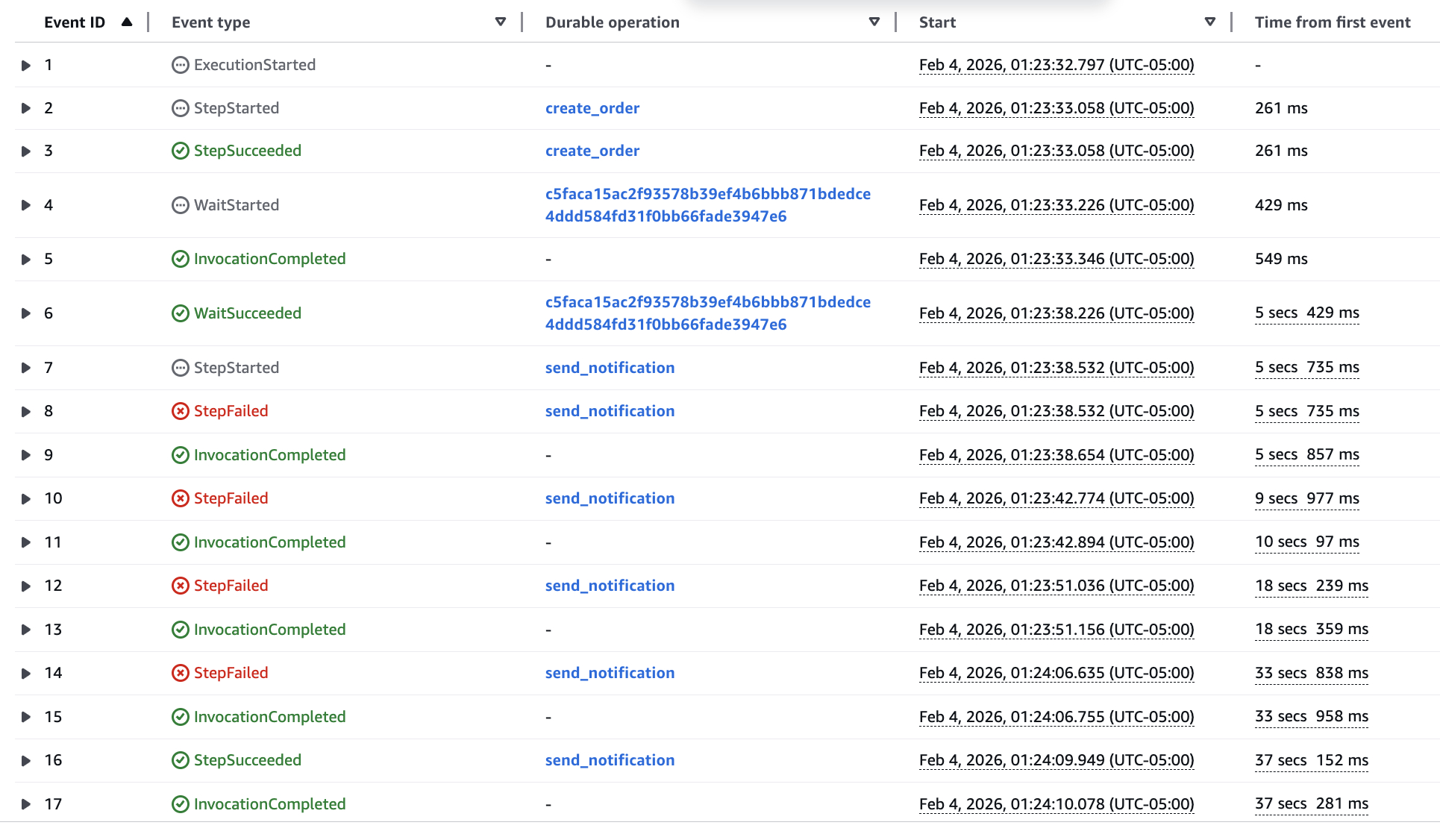
调用代码并等待执行完成。尝试 5 次,然后在 Durable executions 标签页中检查错误
-
以下是工作流在
Send Notification步骤出现 3 次错误的示例。请注意,工作流会自动重试该步骤,而不会重试Create Order步骤或5 秒等待。此外,Durable functions默认重试策略默认提供指数退避。
将函数回退到原来的版本
非确定性与副作用
重放模型对我们编写代码的方式有重要影响:
Side effects 如日志记录、API 调用或在持久操作(如 context.step())之外的数据库写入,每次函数重放时都会执行。这可能导致:
- 重复的日志条目
- 多次 API 调用
- 重复的数据库写入
Non-deterministic code(如 datetime.now()、random() 或 uuid4())在持久操作之外将在每次重放时产生不同的值。这可能导致:
- 数据不一致
- 断言失败
- 意外行为
解决方案是将副作用和非确定性代码包装在 context.step() 中,以将结果设置为检查点,防止其重新运行。
修复此函数,使 print 语句只运行一次:
from aws_durable_execution_sdk_python.config import Duration
from aws_durable_execution_sdk_python.context import DurableContext, StepContext, durable_step
from aws_durable_execution_sdk_python.execution import durable_execution
import random
import datetime


@durable_step
def create_order(context: StepContext):
    order_id = f"order-{random.randint(1, 100)}"
    context.logger.info(f"Creating order... : {order_id}")
    return {"order_id": order_id,
    "total": 50.00,
    "status": "Created"}

    @durable_step
    def send_notification(context: StepContext,

    order_id: str):
    context.logger.info(f"Sending notification...")
    return {"sent": True,
    "order_id": order_id,
    "recipient": "customer@example.com",
    "timestamp": datetime.datetime.now().isoformat()}

    @durable_execution
    def lambda_handler(event: dict,

    context: DurableContext) -> dict:
    print(f"Function started at: {datetime.datetime.now()}")

    # Step 1: Create the order
    order_details = context.step(create_order())
    context.logger.info(f"Order created: {order_details['order_id']}")

    # Step 2: Wait 1 minute (60 seconds)
    context.logger.info("Waiting 1 minute before sending notification...")
    context.wait(Duration.from_seconds(60))

    # Step 3: Send notification
    context.logger.info("Waited for 1 minute without consuming CPU.")
    notification_details = context.step(send_notification(order_details['order_id']))
    context.logger.info("Notification sent successfully...")

    return {"success": True,
    "notification": notification_details}
现在 print 语句已被设置为检查点。在重放时,SDK 返回缓存的结果,而不是再次执行 print。print 语句在日志中应只出现一次。